
Data Editor
When using the editor, make sure that you are using the latest CFDB plugin from GitHub.com, not WordPress. See the home page for details.
Get an immediate download link
| OR |
Didn’t get an email with a download link when you purchased? The link expired? Generate a new download link.
Problems with purchase? Contact info@cfdbplugin.com
Your credit card will list SIMPSONSOFT as the merchant for the transaction.
About The Data Editor
The Data Editor is an extension that provides the ability to edit submitted form data in the Administration console and save changes to the database.

First, Switch To Edit Mode

Edit Data in cells
Click on any cell to edit.
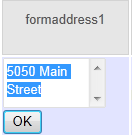
Limitation: Data in the Submit Time column cannot be edited.
Edit Cell Column Names
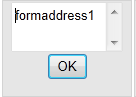
Limitation: The Submit Time column cannot be edited/renamed.
Add New Columns
Great for tracking order status and work flow. Add columns that do not appear as fields on your form for tracking internal information or metadata about each form submission.
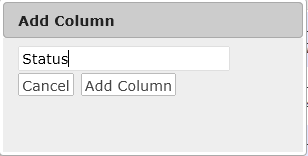
Note: this adds a column to the data. Don’t confuse this with adding a new field to your HTML form. Adding a field to your form will automatically add a new column to your data after the first form submission that has that new column. If you want to add a field to your form, just add the new field in your form definition in Contact Form 7 or Fast Secure Contact form
Delete Columns
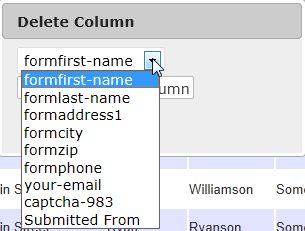
Note: if the column that you delete is a field on your HTML input form, then in addition to deleting the column (the data associated with that field) you will also want to remove the field from your HTML form definition in Contact Form 7 or Fast Secure Contact form. Otherwise, the column will re-appear once a user makes a new form submission containing that field.
Limitation: The Submit Time column cannot be deleted.
Opening an Entry to Edit
Click on the Submitted link for an entry.
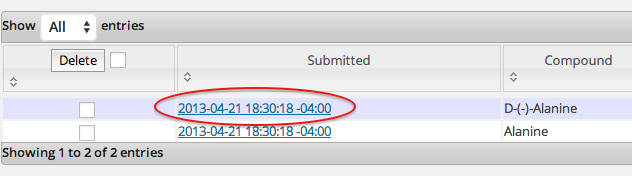
Brings up a new page with more room to edit just the value in that submission. Click on a value to edit.
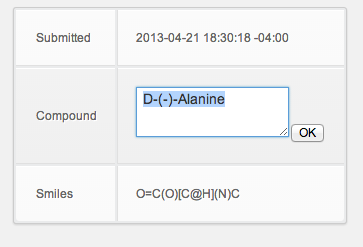
NOTE: When you update an entry in this new page, you will need to refresh the Administration page (table of submissions) to see the change there.
Editing in a Post or Page
To make an editable table on a post or page, use [cfdb-datatable form=”Your Form Name” edit=”true”]. See cfdb-datatable edit option.
Clicking on a cell or column header makes the cell editable just as it does in the administration page. A user can only edit if he is logged in and his role satisfies the Options page -> Can Edit/Delete Submission data setting.
Table column header can be edited but this will not work if you are using the “headers” option in the short code to rename the column headers.
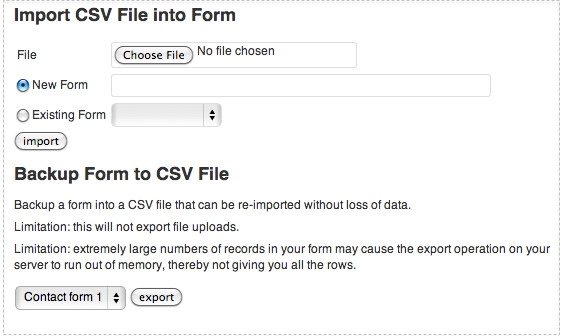
Import/Export Data as CSV
Compatibility
This extension is compatible with CFDB Plugin version 2.0 or later. But be sure to have the latest version so that all the Editor features are enabled.
License
The editor extension is NOT open source. The license terms are set forth in this EULA. Please review before you download. By downloading, copying, installing or otherwise using this software product, in whole or in part, you agree to be bound by the terms of the EULA.
Each purchase grants the rights to install the editor extension in ONLY ONE WordPress installation. However it is acceptable to install the plugin on a production site plus its test and development sites using the same license.
Installation
- Be sure your existing install of the free Contact Form to Database Extension is update to the latest version.
- Purchase and download contact-form-to-database-extension-edit.zip
- Go to your site’s Admin page, Plugins
- Click “Add New“
- On the Install Plugins Page, click “Upload” link
- Select contact-form-to-database-extension-edit.zip and click “Install Now“
- Click “Activate Plugin“
@Gillian
An Update: I can’t speak highly enough of Michael’s support with my issue (which turned out to be due to a MYSQL bug). He has resolved this problem and gone above and beyond by helping me out with other queries as well. This is a wonderful plugin and I highly recommend it.
Gillian
Is there a function or capability of having an automatic export that sends or emails new leads on a daily basis?
I have it working on my site including the attachment. However, is there a way to display the images on a wp page using a shortcode or some other method?
Yes, use cfdb-html with the filelinks option.
can every user then adjust my database. It is in my websites interest that only the treasurer should be able to mark payments, and for example the secretary to mark that a license has been given.
kind regards,
bart
If a user can see the Database Admin page, then he can edit the data. This access is controlled in the Database Options page “Can See Submission data”. If you set that option to “Administrator” for example, then only a user with those rights can edit the data, and users who are “Author”, “Contributor” etc. cannot access the Database admin page at all.
Is there a way to re-order the tables once they are added in the admin section?
Tables in the drop down list are in alphanumeric order; no option to change it. If you meant columns, they are in the order the appear on the form. There isn’t an easy way to change it, you would have to update the field_order column in the DB for the appropriate rows.
@Michael Simpson
Thank-you for your reply. I figured that I add to go into the database and change it there.
Can a field from the form used for a file upload be edited to allow the admin to upload a new file, or does the editing capability just allow you to change the text in the field? Related, in creating a new column, can that be a file upload field? What I am trying to do is create a scholarship application where the applicant has letters of recommendation sent in separately, but then an admin can add the letters as attachments to the original submission.
You can edit the name of the upload file in the editor, that is all. It does not allow you to edit the file. Nor does it allow you to attach a file to a field. Creating a new column with the editor does not allow you to add a file for that column. To add new upload columns, you add them on your submission form as upload fields, but then you will get new submissions. A possible work-around is to have a form for the first submission, then then a separate page with the form of the same name on a different page for attaching files. All submissions are different entries but are associated with the same form. Then use a cfdb-html short code (or the “make your own shortcode option” to pull out the data from all related submissions (you will have to provide some common id in all, like the application email addr) and display the data and all associated file links.
Hello ,
If I buy a plug-in version of the premium, is unique for a site or can I use this plugin for another website ?
Have a good time
houshmand
It is one purchase per WP install. See the EULA.
I would like to know if the data editor is a one time purchase and if it can be used on more than one website.
@Glory
It is one purchase per WP install. See the EULA.
Hello, Loving your Database insert already. Here’s my requirements though before I buy your data editor. I have created a page with your Short Codes with my code being:
[cfdb-datatable form="Intake Form" hide="Submitted Login,Submitted From"]
This is a private page. I want editors and Administrators to be able to edit the database from this page. Without having to go into the Dashboard. Is this possible with this plugin?
And another note, I want to be able to link a User account to a form that they submitted. Any ideas on this?
No, editing is only works through the Database administration page.
is there a way to import csv’s, that you may have xported earlier on?
Unfortunately no.
is there a way to use this with fast secure contact form to have the exported file be emailed as an attachment with every form submission. This doesn’t seem like a clear distinction between asking you or the maker of the other extension. Sorry to ask you both.
No. In fact there is a very loose integration between the plugins so FSCF code is not aware of exporting and CFDB code is not aware of any emails being sent.
Like many other here I too cannot speak highly enough of Michael’s help & speedy support and lets not forget his plugins too. I’m using all of them and they’re excellent.
Thanks Michael we appriciate your efforts!!
I’m using the export to google spread sheet live option but wanted to know if there is a solution to have the rows appear like you have so nicely done in the wordpress admin – The field that contains the entire questionnaire is really long ( even with scroll bars ) and inside google docs i can’t seem to control the row height like you have in word-press admin. I understand this is more geared at google docs issue but wanted to know if anyone has found an answer to this….
i’m work with contact form7+contact form to db extension & contact-form-to-database-extension-edit , and enter a records to db
then Edit Cell Column Names to any. From this time onward , new record to add db , was not save The same column and save in new column .
Is this program the problem?
If you wish to change the name of a form field, you must also change it in your contact form definition. If you use Contact Form 7, edit the form definition there. My editor plugin will change the name of all form submissions saved in the past. To make all future submission match, you must also change for form definition.
Question about how things work after adding the data editor; but it maybe the raw contact form>database process (as I’d updated all plugins before installing the data editor).
I now get funky columns in my database from a form update. Mentioned here: http://wordpress.org/support/topic/plugin-contact-form-7-to-database-extension-_wpcf7_version-column-added-to-database-after-adding-edit-plugin?replies=1
After some testing with a dummy form/database, where I tried to delete the funky columns (but they came back), it seems like the form plugin may now be sending more data that is interpreted as user/form data?
Funky columns added to table: _wpcf7 _wpcf7_version -vpcf7_unit_tag _wpcf7_is_ajax_call
Please see http://cfdbplugin.com/?p=662
@Michael Simpson
Thanks, that solved it; tried searches with one of the column names but now that I look back I see I might have used one that I misspelled in my post. (_vpcf7_unit_tag).
Now to figure out why I have one row, one cell, that won’t let me edit content (opens edit cell without any of the content in the cell).
Hello,
Is there a way to add/include post title of the cf7 in the database?
I use cf7 for event registration, so the submitted form without the name/title of the event is not so useful.
No. But you might try adding a CF7 dynamic hidden field which can be a short code. Maybe you can make a short code that gives that post title?
It looks like contact-form-7-modules can capture post information in the form.
I will try to use this plugin to achive this. I will update if it works. Thanks.
http://wordpress.org/extend/plugins/contact-form-7-modules/
I have a very long form collecting patient health history and insurance information. After I submitted a test entry, I changed the column names to something human readable 🙂 Then I submitted an additional patient and have twice the columns as the new data came in with the original column names… Does this mean I have to change the form field names in both the form and in the email (lots of time)?
That is because your form definition still has the old not-so-readable names in it. Even though you rename existing form entries in the DB to a new column name, new ones that come in have the name that your form definition gave it. Consequently, you now have two columns. You would have to again rename the old-name column to the new-name column to consolidate them into the single new-name column. If you can change the name of the field in the form definition to what you want, that is your best bet.
Ok, thanks!
Just bought the extension!
Really enjoy & appreciate your plugin & support.
Your software saves me so much time!~
Looking forward to see the Import CVS feature soon!
Cheers!
Ok, thanks!
I also built a page that displayed the data columns of the registrants. I can view it in the administration view but when looking from another computer, it displays “You do not have sufficient permissions to access this data”. Will the editor help with this? Page is “Registered Teams” at http://www.bigdoglacrossetournaments.com
@Jim
Go to the Database Options admin page, set “Can See Submission when using shortcodes” to Anyone
Will the edit upgrade allow me to alphabetize the rows of my database by a specified field?
No.
Bummer. Thank you for answering, Michael. I am using C7DB to have people partially register online for a homeschool class day I direct. I know I could export the database to a google spreadsheet in a single transfer and then do whatever I want to the spreadsheet, but then I will have lost the live feature and will have to redo the process anytime someone new registers. We take new students throughout the year so this will be a hassle. Do you have any recommendations for me?
@Sandy G
Have you tried export to Google Live Data? That sets up a google spreadsheet that pulls data from wordpress and should automatically get updates.
@Michael Simpson
Yes, I have done that, but the resulting spreadsheet is ordered by date of registration. I’d like to alphabetize the spreadsheet. Is there any way to do that without losing the “live” function?
You probably can. It would require editing the script code in the spreadsheet. If you look in “function fetchCF7ToDBCSVResponse” for the line:
var url = siteUrl + “/wp-login.php?redirect_to=wp-admin/admin-ajax.php%3Faction%3Dcfdb-export%26form%3D” + encformName;
if the field you are ordering by is “lastname” try changing that line to:
var url = siteUrl + “/wp-login.php?redirect_to=wp-admin/admin-ajax.php%3Faction%3Dcfdb-export%26form%3D” + encformName + “%26orderby%3Dlastname”;
(be careful to use regular double quotes in the script editor, not the slanted ones that you see in this comment)
I am sooo excited! It worked!!! Michael, I wish I could send you flowers. I have to tell you that your plugin has been very helpful to a volunteer-run homeschool class day (www.haaclassday.org). We have grown to a size that hand-entering all of the contact info for the registration data was getting out of hand and taking more time than any volunteer could afford. Honestly, I don’t really know what I’m doing, but I was able to consult online tutorials, read your answers to others questions, get some help from a friend at one critical point, and then just kind of fake like I knew what I was doing even in implementing what you just told me to do and it’s working! I am so excited! Thank you! Thank you! Thank you!
For next year, I’ll try to figure out how to do the rest of our registration online (actually signing up for classes), but for now, I am one happy volunteer!!! Thank you for this wonderful plugin AND for your ongoing support of it!!! God bless you, Michael Simpson!
Ooops. I had it working beautifully for the class day’s spreadsheet. I have a second site and database that uses the same WordPress account. So I have one spreadsheet that says
=CF7ToDBData(“http://www.haaclassday.org”, “Contact form 1”, “”, “login”, “password”)
and a second that says
=CF7ToDBData(“http://www.churchill82.org”, “Contact form 1”, “”, “same login”, “same password”)
Now I’m getting errors in both spreadsheets. Any idea what I’m doing wrong? I may have to put a call into my friend who helped me previously, but I thought I’d ask you, too. I am trying to learn what I am doing well enough that I don’t have to pester people for help. Thank you so much for helping me get to that point!
I’m not sure what the issue would be. Changed password, timeout reaching your WordPress server…?
PS please post such support questions on the support forum: http://wordpress.org/tags/contact-form-7-to-database-extension
Thank you, Michael! I would go to the link you provided, but I figured it out! I had the wrong password in one that was causing the initial error. Then something got boggled accidentally. I never did figure out exactly what I’d accidentally messed up, but both spreadsheets are all good now. THANK YOU!!!!
I purchased the Data Editor to delete columns of meta data (e.g., _wpcf7) from the database and front-end Excel spreadsheet. But whenever someone fills in the Contact 7 form, the meta data shows up again in both the database and spreadsheet. How can I permanently delete all meta data?
You need to stop them from being captured. See http://cfdbplugin.com/?p=662
I read all the comments related to deleting meta data before I purchased the Data Editor. What is the point in purchasing the Data Editor, if I can’t permanently delete the meta data from existing databases and spreadsheets? Some of these are too big to just start over. This should have been explained before the purchase, not after.
@Nathan Muller
If all you want to do is avoid having the _wpcf7 fields, then the data editor is not necessary. How to do this is already documented in http://cfdbplugin.com/?p=662
To be honest everything that can be done with this plugin, can also be done without it. 50$ ?
I would like to have a possibility to save the data to that sql database in a usable way so u can use the data in other programs without modifying them in advance.
Cause that there are only 4 columns (submit time, field value and field name) is kind of annoying when u try to analyse the data with excel and co.
You have to use multiple pivot tables before u really can use the date.
So is there a way to have the “initial” SQL table for example with the coloumn names representing ur ex-fields in the formular and the values of the table as the data the person is sending ?
having only these 4 or 5 columns makes no sende to me to spend that much money.
cheers
Just my 2-cents as a consumer.
The data editor plugin makes it easier to update cells, while looking at rows that make sense for my form/table, while also supporting the search to find what you need to zap.
Zap meaning, this is not end user stuff.
The data format underneath the tool is as it was, before the data editor plugin joined the party. That data format allows for the more generic (and free) tool that can scrape form input, from any kind of form, with any number of changing data value fields in the form, into a general purpose database that works for us all. We’re not really meant to look at it as simple users; admin/strong users of course like to drill down and understand things (I did that once I learned how; being new to Word Press that was a discovery of its own).
The exports provide more natural content, but not with an update cycle.
The live google spreadsheet looked like it might also give you some edit update rights, but I can’t say for sure as I’m still trying to get it to work for me (but I’ve not tried super hard yet).
I’m not going to ask for a redesign of the internals just so they look right to me; I’m going to try and ignore the internals and use the fairly rich function; cheap at the $50 to get the data editor, unbelievable at free for just the form to db capability.
(I’ll ignore internals at least until I try to make my own short code :-}.
Hello there,
Please bare with me if the answer already exists but could not find it.
I’m using the DB editor plugin and changed the name of the fields. However when a new submission in coming, older field names are being populated causing a whole mess in the DB.
What dod I do wrong in here?
Thanks a million
-David
You need to additionally change your FS Contact Form field names to the new names that you want. The editor will change existing data in the DB, but whenever new form submission come it, you get the names as they are defined in the form. You can repeat the process of renaming those new form submission columns to the new column name to effectively move them to the new column.
BTW I’m using FS Contact Form plugin!
@David
Side question on the column management.
Is there a process that can be used to clone the column data such that I can get a second column with the matching data values for all rows? (the original is the before column, then the copied column data is the after column, where changes can be made (and still compared to original).
Might it be something that can be done with a little raw SQL magic vs gestures in the data editor ?
@PatMc
That would need to be done in SQL. Given you have a form named “myform” and a column named “colA” that you want to copy to “colB”, then issue a SQL command:
INSERT INTO wp_cf7dbplugin_submits(submit_time, form_name, field_order, field_value, file, field_name)
(select submit_time, form_name, field_order, field_value, file, 'colB'
from wp_cf7dbplugin_submits
where form_name = 'myform'
and field_name = 'colA')
Thanks worked great! @Michael Simpson
Hi Michael,
I was wondering about the upgrade policy for the data editor addition. Does the $50 fee cover all future updates of that software (as in we can get a new version for free from you)? or is this a cost per version of the software?
For now, the cost includes updates but I’m guaranteeing all updates in perpetuity. But generally I think it only fair to provide updates free to any purchaser.
how can i give admin access to my client without showing the wp backend and is it possible that he can edit the database (I will buy this plugin)?
The plugin does not allow you to do this. You can only edit the data in the admin page.
I used your db plugin for a customer and persuaded them to buy the edit option. The form has a file upload as one of the fields. It appears from the discussion above that an empty file upload field can’t be updated after the database record is created. Is that correct?
If so, I’d recommend adding the ability to edit file upload fields. My customer and I assumed that any field would be editable with the edit add-on plugin. It may be difficult to add this capability to the edit plugin, but most people will assume that any field in the db can be edited.
Overall, this is a very nice plugin!
Point taken. Thanks for the input.
Hi, finally I bought it on uploadnsell. But I have a question, is it possible to view the entire entries in the table, without pagination?
Thanks o lot.
@Alberto García
In the Database Options page, there is a “Maximum number of rows to retrieve from the DB for the Admin display” which may be set to 100. Increase that ensure all entries are pulled into the page. That pulls all the rows into the Database admin page. At the top of the table, you can then change Show XXX entry to control how many are displayed at a time in the table (but they are all there in the table)
Thanks mr. Simpson, but when I change the number of rows I get an Internal Server Error.
Hello,
I’m trying to get all the fields to display in uppercase. I’ve tried a number of functions.
Can you you tell me how to capitalize fields: Streetname?
thank you so much.
Here is the shortcode:
[cfdb-datatable form="Contact form 1" show="HOUSENUMBER,STREETNAME,APTNUMBER,CITY,STATE,ZIPCODE" hide="FirstName,LastName,submit_time,Submitted From,Submitted Login" orderby="STREETNAME,HOUSENUMBER" role="Anyone" permissionmsg="true"]
You can use CSS to uppercase for you.
Try adding this to your short code to capitalize everything in the table:
id="mytable" style="#mytable div { text-transform: capitalize; }"Similarly, you could upper-case everything with `text-transform:uppercase`
If you want to just target the Streetname column, try:
id="mytable" style="#mytable td[title=Streetname] div { text-transform: capitalize; }"Hello Michael,
We are currently utilizing your CFDB plugin and would like to upgrade with the Editor Option ($50). Our computer knowledge is limited and was curious if the plugin will update with all of the current information already there and simply allow us to edit the submitted form data and the database? Thank you Michael, I want to make sure things are safe prior to executing. Enjoy,
Joel
Yes, all information you already have stored in your DB will become editable in the Administration panel.
Excellent Michael, thank you so much. We will be executing shortly.
Hey Michael,
Sorry for posting this here. I just purchased the upgrade, how do I install it on wordpress? I looked for a posting on this but couldn’t find one. Thank you,
Joel
Stand Down Michael, I found it. I just had to slow down and read, simply excited. Terrific program. Best of luck in the future, I look forward to seeing what else you come up with.
@Michael Simpson
First I just want to say THANK YOU for such a great plugin!!!
Secondly, if I purchase the Data Editor plugin, does it allow me to enter new data (row)? This would be extremely helpful 🙂
@Michael Simpson
First I just want to say THANK YOU for such a great plugin!!!
Secondly, if I purchase the Data Editor plugin, does it allow me to enter new data (row)? This would be extremely helpful 🙂
BTW
Entering again because I forgot to check the Notify boxes before submitting **my bonehead move**
Unfortunately no, you can’t add a new row in the editor. You would have to submit from your from.
You can
– edit existing cell values (except Submit Time),
– add, delete, rename columns
– delete rows (which you can do without the editor plugin)
@Michael Simpson
Thanks for the quick response Michael!
How do you delete rows?
Hello Again Michael Simpson,
Can you tell me the name of the database where all of the form data is captured?
@Paul Podczervinski
You don’t need to buy the editor to delete rows. In the admin page, check the rows and click the delete button
@Paul Podczervinski
The data is stored in table wp_cf7dbplugin_submits. See Database table structure rationale
@Michael Simpson
My manager bought the Editor for me today and I LOVE IT! Thank you SO MUCH for making my life easier 🙂
@Pete
Dear Pete,
Can you please let me know how you reorder fill data i need to reorder data fill please.
Thanks
I don’t understand what you mean by “fill data”, and reorder it how?
I need to let my users edit their mistakes that they are making in the DB. They are inviting guests to a party. Is there some kind of work around where I can let them access this via the dash board rather than making everyone an administrator? I want to buy this today. Thanks
No, there is no good work around. Editing must be done via the admin page. Otherwise this opens a security hole.
Hello, just got this plugin and it looks great. Have a few questions:
• I am trying to add a column to the database (from the Contact Form DB admin area) so I click “Edit Data Mode” then “Add Column” filling out the name and click add. The page reloads but I do not see the new column.
• also the site i work for does not track or log IP addresses is there a way to remove the IP address column (and tracking?) from the db? When I click “remove” column I cannot select any columns from the dropdown menu.
Maybe I am missing something.
Thanks in advance for the help.
– Matt
@Matt Elliott
My bad, it just started working after I logged out and back in.
I have added and removed columns successfully!
However, I still want to make sure that the IPs are not being logged anywhere though – it is very important for my company to not allow user anonymity. Any thoughts Michael?
Thank you!
You would have to edit code to stop the IP address from being captured. In the CF7DBPlugin.php file, delete the lines:
            // Capture the IP Address of the submitter

            $order = ($order < 10000) ? 10000 : $order + 1; // large order num to try to make it always last
            $wpdb->query($wpdb->prepare($parametrizedQuery,

                                        $time,

                                        $title,

                                        'Submitted From',

                                        $ip,

                                        $order));
@Michael Simpson
Hello i am using CF7 Data Editor plugin can i edit data form front end (using shortcodes) , right now i can edit my data form wp-admin panel (CF7 db page), if yes please guide me thanks,
No, the plugin only allows editing in the Administration page.
@Michael Simpson
Thanks for that Michael, worked like a charm.
Great plugins.
Hi, Thanks for this great plugin, so useful.
Is there a way to position a column once you add it? Now a new column appears second, I’d like to have it appear further down in the table.
Unfortunately no, there is no simply way to change the column order.
hello sir,
Thanks a lot for such a great plugin.
Is it possible to fetch the database values, that would be used to show my users profile information on my site.
No, this only affects information captured by form submissions.
Thanks for providing such a good plugn.
I found that non-english character can’t display in administration console.Could you please solve this problem?
Thanks.
Hi! I just setup CFDB Data Editor and the “Edit Cell Column Names” feature doesn’t work. I can edit data in cells but not the column names. When I set to edit data mode and click on any of the column names, it doesn’t display the text field where I can edit the column name text. Instead, the sorting happens. Please help.
Thanks!
Thanks for bringing this to my attention. I can reproduce this problem. Clicking on the header is still sorting by the column instead of activating the edit field. I think the recent update the the datatables library is not conflicting. I will see if I can get this resolved in the next couple of days and provide an update.
@Michael Simpson
Sir Michael, Thanks for your response. I hope this can be fixed asap. Please do let me know when it’s done. Thanks! =)
clients have been letting me know they cannot email via the contact page – the code keeps being rejected – is this attributable to this data editor? it worked in the past and now doesn’t
and no one ever explained when the website was set up that it is a service i have to buy? –
could you please let me know where things stand as regards my site?
Micheal
The Data Editor plugin does not interfere with email. Your specific complaints should be directed to the person or company that set up your site.
@Michael Simpson
Sir Michael, any update on the “Edit Cell Column Names” feature not working. When can this possibly be done? Thanks!
@Lar
The problem where column headers were not editable is now fixed. You will need to install the latest version of the plugin at http://cfdbplugin.com/?page_id=939
I’ve just started using your plugin to capture information from a WP form, and it’s been working great. Now I’m interested in learning whether I can upload historical information into the table that’s receiving the data. I just started using the plugin, so my table only has 40 or so rows of data, but I have nearly 6000 rows that I’d like to add. I do not want to enter this information manually, so I only want to purchase the edit data plugin if it can enable me to upload into the table that currently has only 40 rows, but is receiving the new info from the WP form via your plugin. Thanks!
This can be done. There is an import option that comes with the plugin. You can upload a CSV file into an existing form or new form. You will need to prepare the CSV file with the same column header as the form you want to import into. These new entries will have a submit time set to when you uploaded them.
A couple people have had trouble with the import feature. Something on their server stops the upload and they only get a few rows of the file. I haven’t figured out the problem to fix it yet. But if that happens, you can send me the file and worst case I will send you a SQL file that you can upload via PHPMyAdmin to import it there.
Thanks for the confirmation and for the quick response! @Michael Simpson
@Michael Simpson
I have found and fixed the import issue that some people have reported. It is fixed in version 1.2.2
Hi,
I want to test this plugin before buying is there a way to have a trial version?
There is no way to provide an evaluation version.
Is there a way to import the timestamp while importing the data into CFDB? Please help.
You need a “Submitted” column in the csv file and the date needs to be in unix time (a number, seconds since 1970) which can have a decimal value for miliseconds. If you create a Backup export of a form from the Import page, it will be in this format (for an example)
I have a submitted column in the CSV file, but I am not able to convert the time to unix time! Also, the time zone is coming as 00:00. How do I change the time zone to IST or 05:30?
@Sam
Hi, I got the time zone options in the CFDB settings and also understand that by default it takes the WordPress time zone settings. So, I can change the settings in either of the places or both.
Can you please help me out with the time zones import? Vishal had purchased the plugin a couple of days back if you remember. Thanks for your support.
Also, sometimes when I import I am getting several of these warning messages. Can you please let me know why these are appearing? – Warning: date() expects parameter 2 to be long, string given in /home/public_html/staging/wp-content/plugins/contact-form-7-to-database-extension/CF7DBPlugin.php on line 859
@Sam
This should be on the support page, not here.
The warning suggests that your custom time zone value is not being accepted. What did you enter?
I’ll also look into allow you to specify a time format during import so it doesn’t have to be unix time.
Hi there,
Has anyone an idea on how to deal with accents and the search function ?
For example in Spanish, searching for “esta” should find “esta” and “está” or in French searching for “gâté” would give “gate”,”gaté” and “gâté”.
¡ Muchas gracias !
Hi.
In first place, I’d like to apologize, because my english is no big thing.
I’m interested in buying the “contact-form-to-database-extension-edit”, however I must know if it’s possible to edit the source code of it in my project after I buy it. I have a project, and it has a few needs that I must to program, and it depends on editing avaibility of the plugin. Some systems like WHMCS are encrypted, and I’m not able to edit the code.
You get the source code with the download. It is not encrypted. The license does not permit modifying the code, but I am willing to grant you permission if you need it.
@Michael Simpson
Okay Michael, thank you very much.
Hi Michael, I’m not sure about something, if I move my site to other hosting, I can export my database, and then can I import it to my new site with this extension?
Thanks
Yes, using the editor you can import/export one form at a time. To move your whole site, you might find it easier to take a MySQL DB dump which includes all the data. You don’t need the editor to do that.
😀 Thanks a lot Michael!
1) If I add an extra column as an admin, let’s say to track the status of an order…when I export the data, would this additional column appear on the excel file?
2) Also, if I put a direct link on the web page for other users to be able to download the excel file, will they be able to see the additional column as well.
3) Is the payment one time only?…if there are any updates in the future do we get them for free?
Thanks for the support!
1) Yes, new columns will appear in export (assuming at least one entry has data in that field, I think)
2) Export links will also give the extra column (unless you add “hide” or “show” options to the link)
3) Payment is one-time per site where the plugin is installed. All updates are included. You can always download the latest version on the Get the Editor Update page.
thanks Michael that was very helpful….we should get the editor within this week. cheers!@Michael Simpson
Just purchased the extension and it seems to work on a regular page, editing in the datatable, using edit=”true” in the shortcode. But I notice above on this page, it says:
“Limitation: This works only in the administration console, not in regular posts or pages.”
I’m confused, since this seems to be working for me on a regular page.
Will appreciate any info you can share on this.
Thanks for a great plugin,
Mike
That is an out-dated note on the page. I’ll update it. Form are editable in a page or post like this:
[cfdb-datatable form="Your form name" edit="true"]
And is it possible to edit the form’s data in the exported spreadsheet?
Instead of editing data in the Data Editor plugin, just changing the value of the cell in the exported spreadsheet. Does that work?
I’d like to make an “approval column” in my spreadsheet, where I can approve requests by adding “OK” or “NOT OK” into the spreadsheet’s cell.
Thanks in advance
@Michael Simpson
You can export the data to a spreadsheet without the editor. The editor does NOT give you the ability to have edits in the spreadsheet be saved back to the database.
I used this plugin to capture form submissions for a photography competition. We received around 150 entries, and everything was populated into the database, with the exception of about 50 of the submitted images.
Will the Data Editor allow me to insert the missing photos, which I have in emails as attachments, or do I need to resubmit all these entries using our form again? I really hope there’s a better option than the latter. I submitted a few before realizing how unproductive that route would be.
No, it will not allow you to attach files to a form submission after the fact.
@Michael Simpson
Thanks Michael. If I purchase the editor, will it add the necessary column to the CFDB table that would then allow me to insert the images manually through phpmyadmin?
@C4talyst
No, it doesn’t support an operations on images (other than file name change). Sorry.
Hi Michael,
Is it possible to insert html code in the field using editor. I want to put view in one of the columns. How do I achieve this?
Thanks
No, it takes the text as literal not markup. It think a better practice is to apply the HTML in a short code when retrieving it. That way you keep the data and the presentation of the data separate (and can easily change the presentation). The cfdb-html short code is great for allowing you to add markup. For other short codes, Add some jQuery to the “AFTER” section of the short code. For example, make links clickable in tables.
Thanks Michael. It’s such a cool plugin.
Is there shortcode for pagination? If I want to have dropdown to select how many results I want to display
Hi Michael,
I have noticed cfdb-datatable has pagination by default. Is there a way to have the pagination too for cfdb-html?
@mic
No
I’ve used the CFDB plugin for a while, but I only very recently discovered the true power of the plugin… Thank you!
We purchased the Data Editor plugin and have built an internal solution based on the front-end inline editing capability of the datatable. Is there anyway to add drop-downs (or checkboxes or radio buttons) instead of a textarea when you click on field to change its value? We’d like to ensure standardized input of values somehow….
@kevinharter
No, the plugin doesn’t have support for drop-down menus or checkbox. Only an editable text field.
Hi, congratulations for this plugin, I have a question before you buy, it is possible to filter only by the username.
Thank You
You can filter by username but this is unrelated to the Editor. You should try filtering with the free CFDB plugin before you decided to buy the Editor extension. Filtering buy user name only works if the user was logged in when he submitted a form.
Hello, buy the “contact-form-to-database-extension-edit” plugin I just need to know if you can display a different user administrator, ie the Subscriber.
Thank You
Another question, a table is created in the database wordpress, due to data backup
Thank You
Good day!
I purchased the plugin. Changed column names for already submitted entries (e.g. FirstName -> First Name) and it worked. But when I get new submissions of form (Contact From 7) and go to plugins page I see columns duplicated. Old record under renamed columns (First Name), new records under old name columns (e.g. FirstNames).
I need it to be changed once and for all (for all the new submissions).
Thank you!
You need to go to your form definition and change the field with the old name to the new name. Then all new entries will have the name that you want.
@vasquezns
CFDB creates and uses its own tables in the DB
@vasquezns
Understand the security settings: http://cfdbplugin.com/?page_id=625
You can make data visible and editable to subscribers, but beware that any subscriber that comes along could then edit the data.
@Michael Simpson
In Contact Form 7 field name can’t contain space so it should be First_Name, FirstName or something like that. I’ve purchased the plugin with purpose of editing those not-containing-spaces-fileds into Fields With Spaces in it’s name.
Ultimately I need to have column names With spaces in its names.
Feature request: option to export locked/protected files. Any kind would be fine. For example, if an editor or author exports a .csv or other file, he/she would’nt be able to edit it. Ideally a user would hit submit and would get a download link for a completed, submitted and locked form.
Once a person downloads a copy of a file to their own computer, they would be able to make it writable.
Is there a way to export only the rows u want or export one row at the time like with a export link in each row? If not, it’s a feature request.
No way to select rows manually then export at this time.
is it possible to change the order of the columns with this plugin?
Sorry, not possible to change order of columns in the administration panel. If using the cfdb-datatable short code with edit option on a page or post, there you can set he order of the columns with the “show” options of the short code. Some people like to use the short code on a private page instead of the administration panel. This allows you to order the columns and show only those you want to see/edit.
@Michael Simpson,
Nice plugin!
When I use edit=”true” option from a page, it makes the whole table editable. Is it possible to make just one column editable?
Unfortunately no. The only options right now are edit=”true” and edit=”cells”.
Hello,
I bought this plugin and do not know if I’m using the latest version. How can I find the latest version?
Latest version is listed here: http://cfdbplugin.com/?page_id=939
PS. When you update the main CFDB plugin, it will indicate if there is an important update to CFDB Edit in the WP Admin page.
@Michael Simpson
Thanks
Hi, I like to add a calculation function in a new column (date + 10 days), is it possible?
Regards.
Jean
No. The plugin does not support formulas. It is best to export to Excel or Google Spreadsheet then add formulas.
Can you also manually add entries (without CSV import)?
No, only editing existing entries.
Will this plugin allow us to move the order of the columns around so that we’ll be able to export them in the order we want to make it easier to copy/paste the data into our existing master spreadsheet?
It does not allow you to change the order of columns in the administration page.
When using a [sc]cfdb-datatable edit=”true][/sc] shortcode on a page, you can simply use “show” to order the columns.
Hi Michael,
I have some trouble with the front end editing mode. I want to give my users the possibility to edit their data. It have made it work with your plugin, but I can not seem to get the styling right. When I click a cell, a form shows in the cell, but the OK button to submit, does not come into view immediately. I have to scroll in the cell itself to see the OK button. Is there some way to prevent the input of the form of becoming so large?
Thanks in advance.
I don’t have a specific solution for you. You may just have to play with CSS on your site.
Hi , can I try cfdb editor for few days before purchasing ?
Unfortunately there is no demo license.
Hi, I would like to know if it i possible to have an audit log of the cfdb editor. If data is deleted or added, is it ppssible to know who has done the modification, when, IP adress. Thank you for your feedback.
No, there is no audit logging of changes.
Hi, could you please confirm whether this license is perpetual or annual? Thank you.
Perpetual.
Thank you. And thank for two awesome plug-ins (cfdb and Shortcodes and Filters). These have allowed me to create new functionality for my kid’s school site that I wouldn’t have been able to without. Great job!
Hi, I purchased and installed the Edit plugin and now I can edit the database tables in the WP Admin Dashboard but my table on my webpage is still not editable? I’m using this shortcode: [cfdb-datatable form="PIPHours" edit="cells" orderby="fname" show="fname,Event,Notes,Hours"]. Is there something I’m missing?
Thanks for all your help this far. Again, great plug-in.
Is there a way to delete rows from the datatable on a front-end page?
@olde_daddy
No, the delete is only on the administration page.
Michael, I’ve read everything I can possible find, including your post on the Pivot but can’t quite reverse engineer it to accomplish what I need to. I need to update a specific value in a row in one of the form tables. E.g. I have a form called ‘PIPEvents’, the columns are ‘Events’, and ‘Approved’. I need to update the value of ‘Approved’ for a specific Event (i.e. the value of which event will come from a form post but that bit I can handle).
Could you please assist with an example of how I can use an SQL Update statement with the proper schema for your data?
I’ve gotten the following to work but it obviously updates ALL the values in the Approved column, how can I filter it further?
$result = $wpdb->get_results($wpdb->prepare(“update wp_cf7dbplugin_submits set field_value = ‘Yes’ where field_name = ‘Approved’ and field_form_name = ‘PIPEvents'”));
Hi,
I deal with this data editor.
Is it possible that logged-in user can only edit his/her data at frontend ?
Regsrds
This is possible if the user was logged in to WordPress at the time he submitted the form. In that case you add a filter to the shortcode to show entries associated with the user’s login.
[cfdb-datatable form="your-form" edit="cells" filter="Submitted Login=$user_login"]
http://cfdbplugin.com/?page_id=116
Thanks Michael,
Regards
Hi,
For more clarification;
User ,logged-in or logout, must see all entries. But, he only can edit his entries.
That is right?
Regards
@selahattintosuner
No, all the entries shown would be editable. You can’t make it editable for just those entries that belong to him while displaying all the entries.
Thanks Michael, for your description.
Regards
Hi , I have many records and tables in cfdb plugins , will they safe if I install editor ? another question : does editor support auto complete for rooting type or can I make some template for same daily input – (sorry for bad english)
@majefrz
Refer to the security settings to ensure you are not giving write access to the wrong users.
http://cfdbplugin.com/?page_id=625
There is no auto-complete. It is simple text editing.
Hi. Is there a way to perform row deletions from a post page? I’ve create a page using the Editor Plugin so some of my users can edit data in the table. Now I need to allow them to delete rows as well. Thank you.
@olde_daddy
Sorry, there is no row deletion outside the administration page.
hello – this is a really handy plugin and i use it for a competition site. the only issue i have is when i go to export the entries to send to the customer, i have to delete a whole heap of columns that it creates for each entry – ie – 3bcd39b7c2f5f127c28ec5d6c16a1d05
so if i have 100 entries, i have to delete 100 columns all with these random headers.
can you please explain how i can prevent these from generating?
thank you.
Mark
Those extra fields are probably being generated by the WP-Spamshield plugin. See the following to stop getting those fields:
https://cfdbplugin.com/?p=1566
@Michael Simpson
thank you very much for the link to the fix. i will try it out.
Hello, Thank you so much for developing this plugin!
I just purchased 2 licenses to the Data Editor plugin, and I am having problems getting it to work.
The error: “Error: plugin “Contact Form to DB Extension Edit” requires that plugin “Contact Form to DB Extension” to be installed and activated.”
WordPress Version 4.7.3
Contact Form 7 Version 4.7
Contact Form DB Version 2.10.32
Contact Form DB Editor 1.5.1
Am I missing something?
Thank you!
+Jason
Contact Form DB must be installed and activated for the Editor to work. You should only see this message if that is not the case. Or if you installed Contact Form DB in a different directory that it is supposed to be in, then you could see this message.
That got me to the right answer! Thank you so much!
This is what happened:
1. I downloaded the zip: contact-form-7-to-database-extension-master.zip
2. I installed via the WordPress upload function under “plugins -> add new”
-The directory it installed the plugin under was: contact-form-7-to-database-extension-master
-The CFDB Editor plugin needs this directory to be listed without the “master” at the end of the file
3. I deactivated the plugin
4. Renamed the directory to: contact-form-7-to-database-extension
5. I reactivated the plugin
The CFDB Editor plugin started working after this took place.
@ThunderJason
Right. You downloaded the ZIP that GitHub produces instead of a release ZIP. Then GitHub stuck “-master” onto the directory name. When you install it, you then have a second install under the wrong directory name.
Download instead from the releases page: https://github.com/mdsimpson/contact-form-7-to-database-extension/releases
For Pre-sales question: Before i purchase the CFDB editor, can you confirm to me that i can edit all submitted data from the frontend? Pleae reply
Yes. However the Submitted time field is the only item that is not editable.
Hello,
first thanks for your great plugin, its fantastic! With the Editor I could very simple realize an editable table in frontend without big knowledge of php (not jet).
I only noticed that the add column and delete column function (edit mode is active) in admin backend is not working in my wordpress installation (4.8.2. using a child theme), did you heard about this problem already? So far I couldn’t find anything on your page or I overlooked it…
For the moment I solved the problem by adding hidden fields to my CF7 form, I think thats not the best way but to test my pages its ok.
I would like to add two date columns for workflow (accepted, done). And that brings me to the second question, is it possible to add a datepicker to the editable table columns?
(Sorry if this is a stupid question but my knowledge about php, java script…. is still basic)
Hope my english is good enough to explain my problems.
Thanks for your time and regards
Angie
Please update to the latest CFDB plugin. It is no longer on WordPress.org, it is on GitHub. Please see the instructions for updating here: https://cfdbplugin.com/
Thank you so much, it works.
I didn’t notice the newest version before.
Hi, I just purchased the Editor plugin (version 1.5.1), and already have Contact Form DB installed (version 2.10.36). When I go to install and activate the Editor plugin, the following error appears:
“Error: plugin “Contact Form to DB Extension Edit” requires that plugin “Contact Form to DB Extension” to be installed and activated.”
And I can’t change to “edit data mode”. It looks like the Editor plugin can’t see the Contact From DB plugin. Can you please help?
Please uninstall CFDB (the main plugin) and re-install it from a packaged download at: https://github.com/mdsimpson/contact-form-7-to-database-extension/releases
The problem is that if you just pull a .zip off the main Github page, it added “-master” to the directory name, which stops CFDB Editor from finding it.
@Michael Simpson Great, that solution worked thank you!
Hi, error “Error: plugin ‘Contact Form to DB Extension Edit’ requires that plugin ‘Contact Form to DB Extension’ to be installed and activated.” ; I look in the plugin dir, the name is “contact-form-7-to-database-extension-2.10.36”.
I can’t uninstall and re-install a fresh copy without the “-2.10.36” because I don’t want to wipe datas… What can I do?
Well, I replace ‘contact-form-7-to-database-extension’ by ‘contact-form-7-to-database-extension-2.10.36’ in the Edit plugin files every times it comes as a dirname and it seems to work…
Uninstall CFDB then re-install using this packed distribution from GitHub releases page: https://github.com/mdsimpson/contact-form-7-to-database-extension/releases/download/2.10.36/contact-form-7-to-database-extension.zip
This will unzip as a directory named “contact-form-7-to-database-extension”
If you use the wrong .zip off of GitHub then the directory name is different and the CFDB Editor cannot find CFDB.
It should have happened: delete column no longer works, column names no longer populated (WP 5.5, CF 5.2.2, CFDB 2.10.36, FDB Editor 1.5.2, JQuery Migrate plugin).
New information till my las message: my form name was something as My new “contest” (with the quotes), I get rid of them and in the datas of the renamed form, the delete is working well.